Refurbished Panasonic Toughbook CF-33 2-in-1 Computers
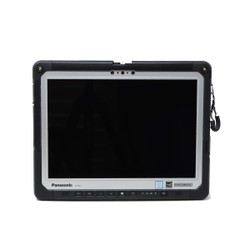
Keep the keyboard when you need to type,
then detach the tablet when your work
moves away from the desk. The Panasonic
Toughbook CF-33 combines a fully rugged
tablet with compatible keyboard-base
options for reports, inspections,
diagnostics, and other mobile applications.
At Bob Johnson’s Computer Stuff,
Inc., we offer refurbished CF-33
configurations with different generations,
installed features, condition options,
and accessory arrangements. Choose
the complete setup your work requires,
not just the model name.
Tablet Alone or a Keyboard-Based Workstation?
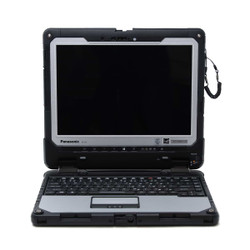
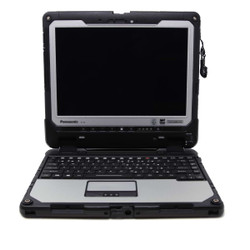
The CF-33’s computer hardware
is housed in the tablet. A
compatible detachable keyboard base
provides a laptop-style working
arrangement when you need physical
keys and a touchpad.
Check the individual listing to
confirm whether a keyboard is
included, available as an option,
or sold separately. Also check
the base type and its connections
rather than assuming all CF-33
keyboards provide the same setup.
Think about where your equipment
will remain connected. A port
on the keyboard base is not
available on the detached tablet,
so confirm which connections
you need in each working mode.
A 3:2 Screen for Forms, Maps, and Documents
The CF-33 uses a 12-inch
display with a 2160 × 1440
resolution and a 3:2 aspect
ratio. That shape provides
a different workspace from
a conventional 16:9 widescreen
notebook.
Panasonic specifies brightness
up to 1,200 nits and
multi-touch plus digitizer
input. Compare the screen
layout against your applications,
especially when reviewing forms,
maps, and documents in
tablet position.
Confirm any required pen,
tether, or other input accessory
on the listing. If you
work with gloves, discuss
the supported input settings
and your specific workflow
before purchasing.
Memory Upgrade Options Depend on the Generation
CF-33 generations are identified by a Mark or
MK designation. Processor capabilities, memory
upgrade options, storage, and wireless hardware
can differ between generations.
On the CF-33 MK1, RAM is soldered to the
system board and is not available as a
standard memory upgrade. Choose an MK1
configuration with enough installed RAM
for your applications and multitasking
requirements.
Our technicians have confirmed that RAM
can be upgraded in the CF-33 MK2.
Check the individual product page for
available memory options, or contact
us to discuss an upgrade before ordering.
Do not assume the same memory arrangement
applies to every CF-33 generation.
Share the complete model number if
you need help confirming upgrade
availability for a particular computer.
Compare the processor, selected memory,
SSD, and operating system against your
software requirements. If officially
supported operating-system hardware is
required by your organization, confirm
eligibility for the configuration
you are considering.
Verify Readers, Cellular Hardware, and Docking
Barcode readers, card readers,
GPS, cellular connectivity,
and specialized ports depend
on the installed hardware.
A feature available for
the CF-33 family is not
necessarily included in every
tablet.
If you require cellular
service, confirm the modem,
antenna setup, carrier
compatibility, and service
requirements. FirstNet use
should be verified for
the exact configuration
rather than assumed from
the Toughbook name.
Already using a vehicle
dock, office dock, keyboard,
or equipment interface?
Share its model number
and your CF-33 requirements
so we can help check
compatibility before ordering.
Twin Batteries for Work Beyond the Keyboard
The CF-33 uses a twin-battery
arrangement in the tablet,
with supported hot-swapping
when the manufacturer’s
procedure is followed.
Detaching the keyboard does
not remove the tablet’s
battery system.
Check the included batteries
and any extended-capacity
options. Runtime depends
on battery condition,
screen brightness, applications,
wireless activity, and
other operating factors.
If your work involves
long periods away from
charging, discuss spare
batteries, compatible chargers,
and your expected workload
before purchasing.
Fully Rugged Protection with Defined Limits
Review the IP rating and
environmental test information
for the exact generation.
CF-33 configurations listed
with IP65 protection are
dust-tight and resistant
to water jets under
specified test conditions.
IP65 does not establish
protection against immersion.
Follow Panasonic’s
instructions for port covers,
seals, handling, and
permitted exposure.
Manufacturer environmental
testing is not a guarantee
against every accident,
and refurbishment should
not be interpreted as
independent recertification
of each unit to its
original test standards.
Our refurbished CF-33 computers
are inspected, tested, and
cleaned before sale. Read
each listing for condition,
included accessories, and
any disclosed wear or
functional limitations.
Every refurbished CF-33 we
sell includes our automatic,
non-transferable Limited
Lifetime Warranty. Coverage
details and exclusions are
available in our
warranty policy.
Need help choosing a tablet
and keyboard combination?
Call
302-659-2727
or complete our
Selection Assistance Form.
Tell us which applications,
connections, accessories, and
working modes you need.
Frequently Asked Questions

|
Can I use the CF-33 without its keyboard?
|
Yes. The computer
hardware and batteries
are in the tablet,
so it can operate
independently of a
compatible keyboard base.
Check which connections
are on the tablet
and which are on
the base. Equipment
connected through the
keyboard base will
not remain connected
when you detach
the tablet.
|
Can I upgrade the RAM in a Toughbook CF-33?
|
It depends on the generation.
The CF-33 MK1 has RAM soldered
to the system board, so choose
enough installed memory when
purchasing an MK1.
Our technicians have confirmed
that the CF-33 MK2 supports
RAM upgrades. Check the product
page for available options,
or call
302-659-2727
to discuss your requirements.
For other CF-33 generations,
contact us with the complete
model number so we can confirm
the applicable memory options.
|
Is a detachable keyboard included with every CF-33?
|
Included equipment depends
on the listing.
Check whether you
are purchasing a
tablet-only configuration
or a package with
a keyboard base.
Review the keyboard
type, included accessories,
and selected options.
If you already own
a keyboard or dock,
ask us to confirm
compatibility before purchasing.
|
Does every CF-33 include cellular or FirstNet connectivity?
|
No. Cellular capability
depends on the installed
modem, antennas, and
configuration. Service
also requires compatible
carrier coverage and
an appropriate plan.
If you require FirstNet
or another specific
service, contact us
before ordering to
confirm the hardware
and applicable service
requirements.
|
What warranty and troubleshooting support come with a refurbished CF-33?
|
Every refurbished CF-33
we sell includes our
automatic, non-transferable
Limited Lifetime Warranty.
Diagnostics and labor
are covered for as
long as you own
the computer.
The first six months
also include eligible
replacement parts,
excluding batteries.
After that initial
period, necessary
replacement parts are
charged separately.
Review our
warranty policy
for complete terms
and exclusions.
For help with an
existing computer, our
CF-33 troubleshooting guide
covers model identification,
keyboard-base connections,
touchscreen issues,
and other service
questions. Contact
our team for
assistance with your
specific unit.


 9am – 5pm Eastern, Monday – Friday
 133 N Dupont Blvd Ste 103, Smyrna, DE 19977
 Sale Tax Free Shopping!