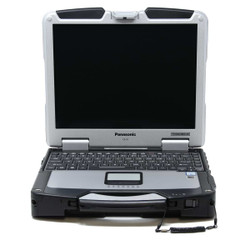
Refurbished Panasonic Toughbook CF-31 Laptops for Sale
Choose a Toughbook CF-31 for a fully rugged laptop
with a built-in keyboard, carrying handle, and
connections for field equipment. At Bob Johnson’s
Computer Stuff, Inc., we offer refurbished CF-31
configurations for diagnostics, public safety,
utilities, service work, and other mobile applications.
Compare the generation, processor, memory, storage,
condition, and installed options on each listing.
Start with your software and equipment requirements,
then choose the configuration that fits your work.
MK5 or MK6? Look Beyond the CF-31 Name
CF-31 laptops were produced in multiple generations,
identified by a Mark or MK designation. Two computers
labeled CF-31 can have different processors, memory
types, and installed hardware.
Panasonic’s standard MK5 specification uses
an Intel Core i5-5300U processor and DDR3L memory.
The MK6 moves to an Intel Core i5-7300U processor
and DDR4 memory.
Need more memory for demanding applications or
multitasking? Our technicians at Bob Johnson’s
Computer Stuff, Inc. have tested and confirmed
that the Toughbook CF-31 MK6 supports up to
64GB of RAM. This is a BJCS-tested upgrade
capability beyond the 16GB configuration documented
in Panasonic’s published MK5/MK6 comparison.
The 64GB capacity applies to the MK6, not every
CF-31 generation, and does not mean every MK6
listing includes 64GB installed. Check the
selected memory configuration on the product
page, or call
302-659-2727
to discuss a 64GB upgrade before ordering.
If you are replacing an existing CF-31, share its
complete model number with our team. We can help
you compare generations and check the features
you want to retain.
Serial Ports, Diagnostic Interfaces, and Vehicle Docks
The CF-31 is worth considering when your work
involves specialized equipment or older connections.
Check the individual configuration for the ports
and interfaces your tools require.
Before ordering, confirm the requirements for
your diagnostic interface, serial equipment,
external displays, network connections, and
any expansion hardware.
Do not assume a dock or accessory from an older
Toughbook will work simply because the computers
look similar. Send us the dock or accessory model
number so we can help check compatibility with
the CF-31 configuration you are considering.
A 13.1-Inch Display Built Around Field Use
Panasonic’s MK5 and MK6 specifications list
a 13.1-inch XGA touchscreen with a resolution of
1024 × 768 and brightness rated at 1,200 nits.
Panasonic CircuLumin technology combines display
treatments designed to improve outdoor readability.
The screen’s resolution and proportions
differ from many newer widescreen laptops.
Check that your applications display correctly
at 1024 × 768, especially if they require
larger windows or higher resolutions.
For a closer look at the layout and connections,
watch our
Panasonic Toughbook CF-31 walkthrough.
The video demonstrates an MK4, so use the product
listing to confirm the features of the generation
you plan to purchase.
Check Windows Compatibility Before You Buy
Review the installed operating system on the
individual listing. We offer CF-31 configurations
with Windows 11 installed using a method that
bypasses hardware eligibility requirements.
Windows 11 being installed does not make the
computer officially supported Windows 11 hardware.
Microsoft does not recommend installation on
devices that fail its minimum requirements,
and updates, including security updates,
are not guaranteed on those devices.
If your organization requires officially supported
Windows 11 hardware, contact us before ordering
so we can help you consider a suitable alternative.
If you need Windows 10 for legacy software, ask
about availability and support considerations.
Fully Rugged Does Not Mean Damage-Proof
Our listed CF-31 configurations carry an IP65
rating. This describes dust-tight protection
and resistance to water jets under specified
test conditions, not protection against immersion.
Follow Panasonic’s instructions for port
covers, seals, operating conditions, and handling.
Manufacturer environmental test results do not
mean every refurbished computer has been
independently retested or is protected against
every accident.
Compare Standard, Low Hour, and Scratch & Dent Options
Our CF-31 selection includes separately labeled
condition options. Review each listing for its
condition, usage information where provided,
disclosed wear, and any functional limitations.
Our refurbished laptops are inspected, tested,
and cleaned before sale. Inventory photos may
show a representative unit from the same batch
rather than the exact individual computer shipped.
Contact us if you have a specific condition concern.
Every refurbished CF-31 we sell includes our
automatic, non-transferable Limited Lifetime
Warranty. Review the available extended warranty
options and our
complete warranty policy
before purchasing.
Need help choosing a CF-31? Fill out our
Selection Assistance Form
or call
302-659-2727.
If you are comparing other Panasonic models,
browse our
refurbished Toughbook selection.
Frequently Asked Questions

|
What is the difference between a CF-31 MK5 and MK6?
|
Panasonic’s standard specifications
identify a Core i5-5300U processor and
DDR3L memory for the MK5, compared with
a Core i5-7300U and DDR4 memory for
the MK6.
Both specifications list a 13.1-inch,
1024 × 768 touchscreen rated at
1,200 nits. Compare the individual
listing for installed memory, storage,
options, condition, and operating system.
|
Will a CF-31 work with my existing vehicle dock or diagnostic equipment?
|
Compatibility depends on the exact dock,
interface, software, and laptop configuration.
Do not assume every accessory for an older
Toughbook will work with the CF-31.
Share the accessory model number, software
requirements, and required connections with
our team before ordering so we can help
check the setup.
|
Does the Toughbook CF-31 officially support Windows 11?
|
The CF-31 configurations discussed here
do not meet Microsoft’s official
Windows 11 hardware requirements. We
offer configurations with Windows 11
installed using a method that bypasses
those requirements.
Microsoft does not recommend this
installation on ineligible hardware.
Compatibility issues are possible, and
updates, including security updates,
are not guaranteed.
Check the operating system shown on
the listing. If officially supported
Windows 11 hardware is required for
your organization, contact us before
purchasing.
|
Can I use the CF-31 outdoors in bright sunlight?
|
Panasonic specifies a sunlight-viewable
1,200-nit touchscreen with CircuLumin
technology for the MK5 and MK6.
Check the listing for the screen
configuration and condition.
The display is 13.1 inches with a
1024 × 768 resolution. Confirm
that this resolution works with your
applications as well as your outdoor
viewing requirements.
|
What should I check before buying a refurbished CF-31?
|
Review the generation, processor, memory,
storage, operating system, ports, and
installed options. Then read the
condition notes and check included
accessories.
Pay particular attention to any disclosed
limitations on Scratch & Dent
listings. If you need help evaluating
a configuration or replacing an existing
CF-31, contact us with your requirements
and current model number.
|
What warranty and repair support come with my CF-31?
|
Every refurbished CF-31 we sell includes
our automatic, non-transferable Limited
Lifetime Warranty. Diagnostics and labor
are covered for as long as you own
the computer.
The first six months also include eligible
replacement parts, excluding batteries.
After that initial period, necessary
replacement parts are charged separately.
Extended warranty options and exclusions
are explained in our
warranty policy.
Already own a CF-31 and need help?
Our
CF-31 issues and repair guide
discusses port covers, touchpads,
touchscreens, and cooling fans.
Contact our team for help with
your specific problem.


 9am – 5pm Eastern, Monday – Friday
 133 N Dupont Blvd Ste 103, Smyrna, DE 19977
 Sale Tax Free Shopping!