

 9am – 5pm Eastern, Monday – Friday
 133 N Dupont Blvd Ste 103, Smyrna, DE 19977
 Sale Tax Free Shopping!
A note on model numbers (for Toughbook nerds)
5th Dec 2025
If you’re reading this, you are either doing your research before buying a Toughbook, looking for a replacement part for your Toughbook, or you are a Toughbook nerd. (I use that as a term of endearment.) Decoding the long-form model number of your Toughbook can help you determine which specifications are essential to you.
The model number has eleven characters, starting with the Panasonic Toughbook's abbreviated model (CF-33, FZ-55, etc.). These model numbers indicate the device's generation, hardware, operating system, and country. We list the full model number in each product description. Consider this information when reviewing listings.
Since we refurbished these computers, not all of this information may match the model number. One thing that we have been including on all of our refurbished rugged computers is RAM and SSD upgrades. We include at least 16GB of RAM and a 256GB SSD, whether it came with one originally or not. However, some units, like the Panasonic Toughbook FZ-55s, which we occasionally get, come with 32 GB of RAM or a 512 GB SSD. We would leave those upgrades in when we list the computer.
The Big Table of Toughbook Models
Although much of a Toughbook's model number becomes more or less meaningless after refurbishment, the "mark" (MK) can't change. That is, an MK1 Toughbook will not become an MK2, and vice versa. Once you've determined a Toughbook's mark, you can learn a lot about the device. You can quickly discover what kind of processor it has, how old it is, and much more.
The full model number of any Toughbook is "CF-" or "FZ-" followed by nine characters. A Toughbook's mark always correlates with the third character after the "CF-": CF-33Axxxxxx, CF-54Rxxxxxx, etc.
Here's a big table to help you figure out the mark of most Toughbooks (last updated December 5, 2025):
| Toughbook Model | MK1 | MK2 | MK3 | MK4 | MK5 | MK6 | MK7 | MK8 |
|---|---|---|---|---|---|---|---|---|
| CF-73... | E | J | ||||||
| CF-74... | C / D | E / F | G / H | J / K | ||||
| CF-18... | B | D / E | F / G / H | K / L | N / P | |||
| CF-19... | C / D / E | F / G / H / J | K / L / M / N / P / Q | R / S / T / V / W | A / B / X / Y / 7 | 0 / 1 / 2 / 3 / 4 | 5 / 6 / 8 / 9 | Z |
| CF-20... | A / B / C / D | E / F / G / H | ||||||
| CF-28... | 1 | 2 | 3 / S | |||||
| CF-29... | C / D | E | H / J | L / M | N / P | |||
| CF-30... | C / D / E | F / G / J | K / L / M / Q | |||||
| CF-31... | A / B / C / D / E / F / G / H | J / K / M / N / P / Q / R | S / U / V | W / X / Y | 1 / 2 / 3 / 4 | 6 / 7 / 8 / 9 | ||
| CF-33... | A / B / C / D / E / L / M / N / P / Q / V / W | G / J / K / R / S / X / 1 / 2 / 3 | T / U / 4 / 5 / 6 / 7 | Y / 8 / 9 / 0 | ||||
| FZ-40... | A / B / C / D | E / F / G / H | ||||||
| CF-50... | W / Y | A / B / X | D / E / F / G | xxxxD / Jxx | xxxxExx | |||
| CF-51... | xxxxA / H / Q / B / J / Rxx | xxxxC / K / D / Lxx | xxxxE / M / F / Nxx | |||||
| CF-52... | A / B / C / D | E / F / G / H / J | M / N / P / Q / R | S / T | V / W | |||
| CF-53... | A / D / E | J / L / M / N / P / Q / R | S / U / V / Y / Z / 1 | 2 / 3 / 4 / 7 | ||||
| CF-54... | A / B / C | D / E / F | G / H / J | |||||
| FZ-55... | A / B / C | D / E / F | G / J | |||||
| CF-C1... | A / K | B / L | ||||||
| CF-C2... | A | C | ||||||
| CF-F9... | K | |||||||
| CF-H2... | A / B / C | F / G | P / Q / R / S | |||||
| FZ-G1... | A / B / C | F | J / K / L / M / N | P / Q / R / S / T | U / V / W | |||
| FZ-G2... | A / B / C / D | E / G / K / M | N / P | |||||
| FZ-M1... | A / C | D / ECD / EAF / F / ECF | G / J / HCJ |
What Does The Model Number Represent?
At one point, the community kept up with the different versions of the model number and what each letter represented. Sadly, the latest unit that they kept track of was the Panasonic Toughbook CF-30.
The full model number of a CF-30 that we once sold was CF-30CTQAZBM. Let’s break that down. In this particular model number, these are what all of the letters stood for.
- C indicates that it is a first-generation (mk1) unit.
- T means it originally came with a 1000-nit touchscreen.
- Q means that, new out of the box, this computer had 512 MB of RAM.
- A indicates that there are no integrated options.
- Z: No WWAN.
- B means it ran Windows XP.
- M: Sold in North America.
Panasonic Toughbook Configurator Tool
Now, how do you tell what you have in your current Panasonic Toughbook? Panasonic has a fantastic product configurator. Just enter your complete model number to get information about your laptop or tablet. This information includes the generation and specifications of the rugged laptop when it was shipped from the factory. Plug your model number into the configurator, and it’ll spit out everything your unit had when it was new, as long as it’s not too old.
I ran a couple of model numbers that we currently have available to see what they spit out. I first ran the Panasonic Toughbook CF-33DPVAAKM:
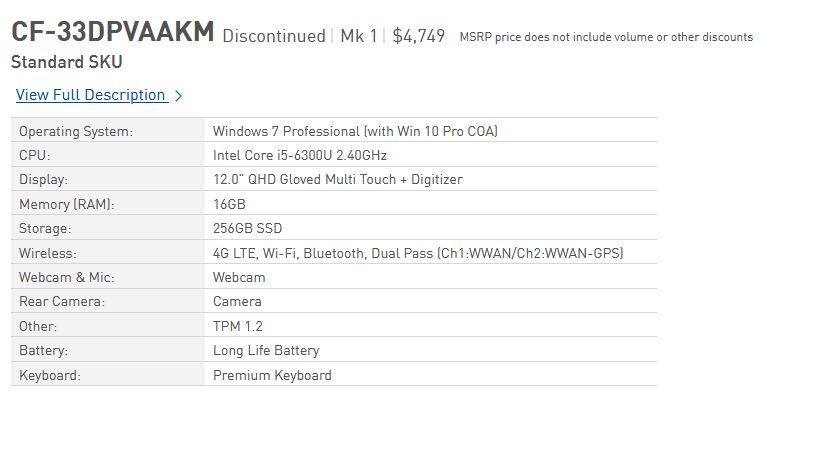
Another laptop that we have available is the Panasonic Toughbook FZ-55F2601KM: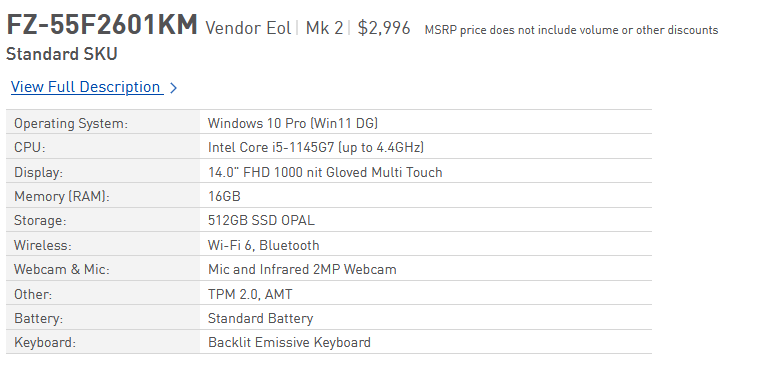
Understanding the Toughbook model number can help you make informed decisions, whether you’re shopping for a new rugged computer, a refurbished rugged computer, or searching for replacement parts. While refurbishment can change many of the original specs, the model number—especially the mark—remains a key indicator of your device’s core features and generation. Be sure to use Panasonic’s configurator tool to verify your Toughbook’s details and get the most out of your investment. Happy Toughbook hunting!