


Durabook U11-G3 Basic
$2,499.00
- Processor
- 12th Generation Intel Core i5
- Memory
- 8GB RAM
- Storage
- 256GB SSD
- Build
- Fully-Rugged
 9am – 5pm Eastern, Monday – Friday
 133 N Dupont Blvd Ste 103, Smyrna, DE 19977
 Sale Tax Free Shopping!

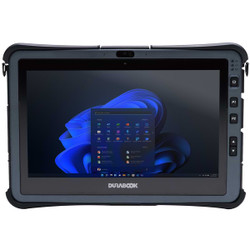

Keep your equipment connections close at hand with the Durabook U11-G3. This 11.6-inch Windows tablet combines a fanless design, built-in Ethernet, Thunderbolt 4, and configurable expansion for work that depends on more than a wireless connection.
Compare Basic, Standard, and Field configurations around the hardware you need. This category also includes a U11-EX listing, which should be reviewed separately when hazardous-location approval is required.
The U11-G3 platform includes Gigabit Ethernet, Thunderbolt 4, USB-A, microSD, and an audio combination jack. Available expansion choices can include serial connectivity, barcode scanning, additional USB connections, and authentication readers.
Not every option can be combined. Certain USB, serial, and barcode choices are mutually exclusive, while other expansion selections can compete for the same space. Provide your complete requirements before choosing a configuration.
If your workflow requires smart cards, RFID, or legacy expansion hardware, confirm the exact supported combination and current availability rather than assuming every platform option is installed.
The U11-G3 platform uses onboard LPDDR4x memory, with manufacturer configurations listed up to 32GB. Choose sufficient installed memory when ordering rather than planning around a standard removable-RAM upgrade.
Its quick-release SSD arrangement supports removing the storage assembly without opening a cover. Confirm the selected drive capacity, compatible canister, and any required OPAL capability.
Removable storage is not automatically encrypted or ready for another computer. Follow your organization’s data-handling procedures and check operating-system, licensing, and software requirements before exchanging drives.
The U11-G3 has an 11.6-inch, 1920 × 1080 display. Durabook lists a 1,000-nit DynaVue sunlight-readable screen as an option, along with optional active digitizer hardware.
Confirm the installed display and compatible pen if you work outdoors or require precise handwriting and annotation. Selectable touch modes support Finger/Water, Glove, and Stylus use according to the manufacturer’s instructions.
A compatible detachable keyboard can provide physical keys for reports and equipment software. Check keyboard inclusion and connections separately from the tablet’s own ports.
The U11-G3 uses Durabook’s Coolfinity fanless thermal design. It still has defined operating limits, so follow the manufacturer’s environmental instructions rather than treating a fanless design as unlimited heat tolerance.
Standard and high-capacity batteries support different charging routines. Battery changes without shutting down require the optional bridge battery, for which Durabook specifies a swap window of up to five minutes.
Confirm bridge-battery inclusion on the exact listing. A removable main battery or high-capacity battery alone does not establish battery-swap support.
Review cases, straps, and docks against the installed battery and expansion modules. Some carrying accessories have restrictions when combined with a high-capacity battery or expansion hardware.
Wi-Fi and mobile broadband are separate features. If cellular access is required, confirm the installed modem, carrier compatibility, antennas, and service requirements. Our Field listing identifies included 4G hardware; do not assume the same equipment is supplied with every configuration.
Durabook specifies IP66, MIL-STD-810H, and MIL-STD-461G for the U11 platform. IP66 describes dust-tight protection and resistance to powerful water jets under specified conditions, not immersion protection.
Rugged specifications are not guarantees against every accident. Follow instructions for covers, seals, maintenance, battery installation, and permitted operating conditions.
Hazardous-location suitability must be checked against the exact model, approval, and configuration. Do not assume a standard U11-G3 has the same approvals as a U11-EX, or that an optional approval covers every hazardous location.
Durabook lists a three-year Accidental Damage Warranty for the U11, subject to terms, exclusions, repair limits, and separate consumable coverage periods. Confirm the coverage stated for your selected configuration and review Durabook’s warranty terms.
For hardware combinations, current lead times, and deployment requirements, call 302-659-2727 or complete our Selection Assistance Form. Browse Durabook U11 accessories for compatible keyboards, batteries, carrying equipment, and docks.
What should I compare between U11-G3 configurations? |
Check installed memory, SSD capacity, display brightness, bridge-battery support, cellular hardware, readers, and included accessories. Configuration names alone do not identify every installed feature.
Can I upgrade the RAM in a U11-G3? |
The U11-G3 uses onboard LPDDR4x memory rather than removable RAM modules for a standard upgrade. Select enough installed memory when purchasing; changing the SSD does not increase RAM.
Does every U11-G3 support battery swapping without shutting down? |
No. Confirm the optional bridge battery in the selected configuration. On a supported setup, follow Durabook’s replacement procedure within the specified five-minute swap window.
Is a standard U11-G3 equivalent to a U11-EX for hazardous locations? |
No. Confirm the exact approval required by your workplace and match it to the model, configuration, accessories, and operating restrictions. A rugged rating or shared U11 name does not establish equivalent hazardous-location approval.
Not sure which rugged computer is the right fit? We’re here to help. Fill out our quick Selection Assistance Form or give our office a call and speak with a real expert who knows these systems inside and out. We’ll take the guesswork out of the process and help you choose the best product for your needs—no pressure, just honest guidance.