

 9am – 5pm Eastern, Monday – Friday
 133 N Dupont Blvd Ste 103, Smyrna, DE 19977
 Sale Tax Free Shopping!
Solutions to the Most Common Problems with the Panasonic Toughbook CF-33
19th Dec 2025
If you own or are considering purchasing a Panasonic Toughbook CF-33, it’s essential to be aware of common issues that can arise with these rugged devices. This guide isn’t meant to scare you away from owning a CF-33—in fact, these machines are known for their durability and reliability.
Instead, our goal is to help current owners troubleshoot problems with expert refurbishers and to inform prospective buyers about the most common failure points and challenges people encounter. With this knowledge, you can make informed decisions and keep your CF-33 running smoothly.
With that said, if you’re facing any of these issues and your Toughbook needs repair, fill out our repair form and send it to us. We have plenty of spare parts and can troubleshoot the problem, ensuring the correct part is replaced the first time.
Common Questions and Challenges With The CF-33 Panasonic Toughbook
We frequently hear from customers who have trouble finding specific information or navigating certain features of the Panasonic Toughbook CF-33. Some of the most common questions we receive include:
- Can I Upgrade the Memory On My CF-33?
- How do I identify which generation (MK) or configuration I have?
- How do I boot to BIOS on my Panasonic CF-33 Tablet?
- What should I do if the touchscreen, keyboard, or other components stop working?
Many users also reach out for help with basic use of the unit, such as enabling the keyboard backlight, troubleshooting connection issues, or learning how to detach and reattach the keyboard base.
If you’re having trouble finding the information you need or if something isn’t working the way it should, our team is here to help. We encourage you to use our technical support form for personalized guidance, and we’re constantly updating this resource with answers to the most frequent questions and challenges our customers face.
 Upgrading The RAM (Memory) in A CF-33 Toughbook: It’s Not Recommended
The Panasonic Toughbook CF-33 has its RAM soldered directly to the system board, so it cannot be upgraded. Attempting to upgrade the RAM is not recommended, as it requires advanced technical skills and could permanently damage the device. When purchasing a CF-33, be sure to choose a configuration with enough RAM for your needs, as you will not be able to increase it later.
How Do I Activate the Keyboard CF-33 Detachable Keyboard Backlight?
Many users have questions about the keyboard backlight feature on the CF-33. In most cases, the backlight can be toggled using Fn + F12. If the backlight isn’t working, check your Toughbook’s BIOS settings or reinstall the Panasonic Hotkey driver. Sometimes the backlight may be turned off in power-saving modes, or it may need to be replaced if the hardware is faulty.
Panasonic Toughbook CF-33 Boot Menu Key
Accessing the boot menu on a CF-33 is necessary for tasks such as reinstalling the operating system or troubleshooting. Typically, you can access the boot menu by pressing F2 or F12 immediately after powering on the device, while the keyboard is connected. Without the keyboard, you tap the top left corner of the screen while it’s booting until the menu appears.
Panasonic Toughbook CF-33 Model Number
Identifying your CF-33’s specific model number is essential for finding compatible parts, upgrades, and support. The model number is usually located on a sticker on the battery door. It can also be found in the system BIOS. Knowing the exact model ensures you get the correct drivers and accessories for your Toughbook.
Once you know your model number, you can see which MK (or generation) you have using the list in our Toughbook Model Numbers for Nerds blog.
 Repairs and Maintenance on The Panasonic Toughbook CF-33
We’ve just covered some of the most common questions we get about the Panasonic Toughbook CF-33. Now, we’re going to transition into some of the real-world issues our technicians encounter when repairing or upgrading these units.
Repairing a CF-33 can be challenging due to its rugged design and integrated components. With that said, it is also one of the easiest Toughbooks to work on because most of what you need is together.
It’s essential to use the correct tools and follow step-by-step guides when attempting repairs. Typical repairs include replacing screens, batteries, and keyboards. We have a wide variety of repair walkthroughs on our YouTube Channel. If you don’t see the repair or upgrade you’re trying to complete, use our video request form.
Panasonic Toughbook CF-33 Screen Replacement
Screen replacements are a common repair for the CF-33, especially in rugged environments. Replacement screens must match your model’s specifications. To replace the screen, you’ll need to carefully disassemble the display housing, disconnect cables, and follow anti-static precautions. If you’re not comfortable doing this yourself, it’s best to have a professional perform the replacement to avoid further damage.
Touchscreen Issues Near the Bottom
A common issue with the CF-33 is that the touchscreen may become unresponsive, especially near the bottom edge. This can be intermittent and difficult to reproduce during diagnostics. Cleaning the screen and recalibrating the touch function can help. If the problem persists, it may be a hardware issue that requires screen replacement.
 Base Disconnection Issues
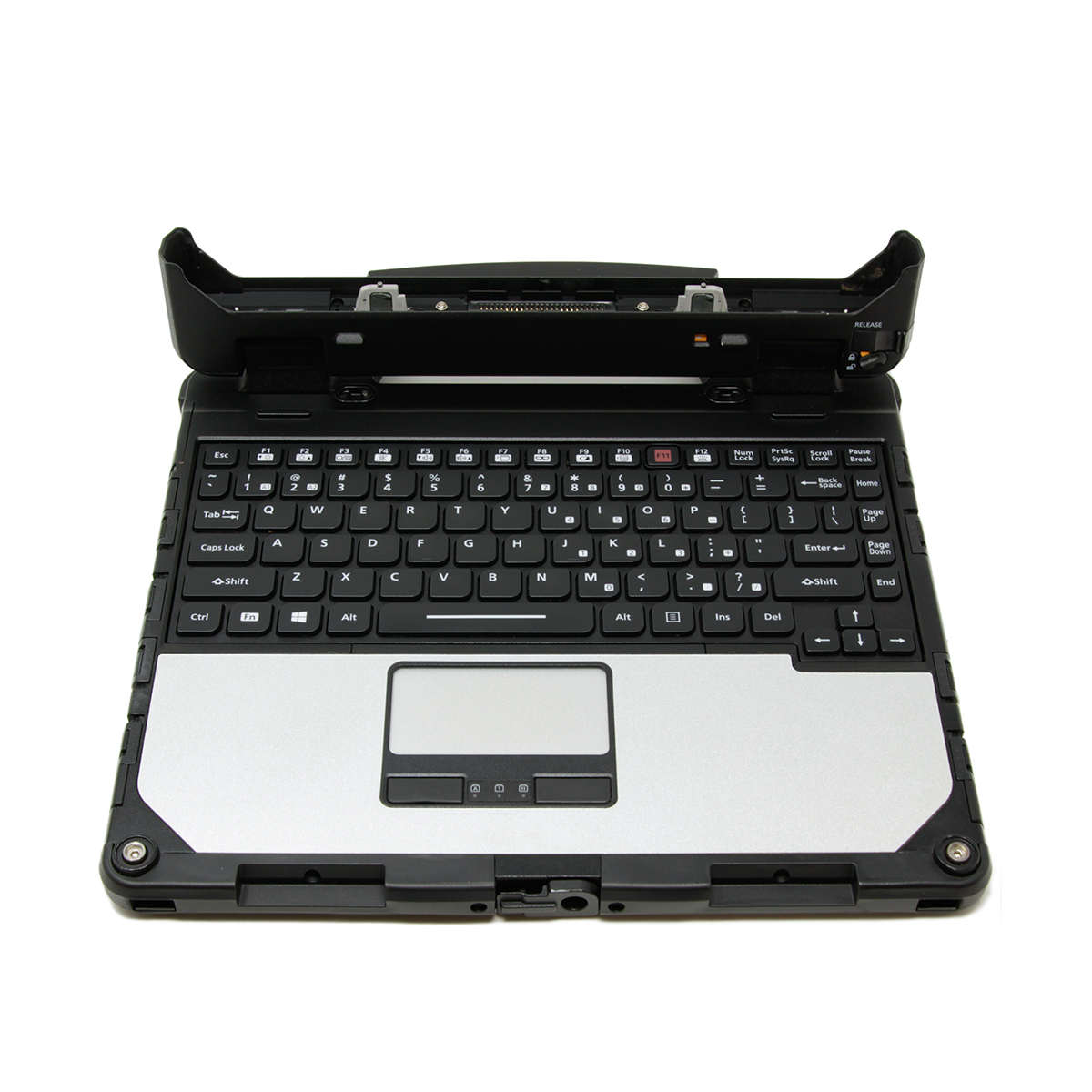
Some CF-33 users report that the tablet unexpectedly disconnects from its keyboard base. This can be due to worn or damaged connectors, debris in the connection ports, or firmware issues. Regularly clean the connection points and check for firmware updates. If the problem continues, consider having the connectors serviced or replaced.
Mousepad Stops Working
The touchpad or mousepad on the CF-33 may stop functioning due to driver issues, hardware faults, or accidental disabling via keyboard shortcuts. First, check device settings and try reinstalling touchpad drivers. If that doesn’t work, test with an external mouse to determine if it’s a hardware issue. Persistent problems may require professional repair.
Sometimes Base Issues Are Motherboard Related
On rare occasions, if the keyboard base stops functioning, the problem may stem from a fault on the motherboard rather than the base itself. Diagnosing this requires technical expertise, and often, the device needs to be inspected by an authorized Panasonic technician to confirm and resolve the issue.
WWAN Cable Can Prevent Booting
A rare but notable issue is that if the WWAN cable inside the CF-33 is not seated correctly or is crooked, the entire computer may fail to boot. If your CF-33 is having issues booting, this is a quick common issue to check.
It could come loose if you’ve recently opened the device for repairs or upgrades, or if you dropped or moved the computer the wrong way.
Bob Johnson’s Computer Is Always Happy To Help With Any Toughbook Need
We hope this guide has helped answer your questions and given you insight into the real-world challenges of the Panasonic Toughbook CF-33. Remember, we have a full-service repair department ready to tackle any issues you may encounter, from minor repairs to major upgrades. If you have additional questions or need technical assistance, please fill out our technical support form—our team is always happy to help.
This page will continue to grow as more questions and topics come up, so if there’s anything you’d like to see covered, let us know! Help us out by sharing your experiences or requests, and we’ll make sure this resource stays as helpful as possible for the Toughbook community.