

 9am – 5pm Eastern, Monday – Friday
 133 N Dupont Blvd Ste 103, Smyrna, DE 19977
 Sale Tax Free Shopping!
How Vibration Testing Is Done on Rugged Computers
13th Mar 2026
Anyone who has ever had the misfortune of traveling in the passenger seat of a utility vehicle down a gravel road will attest that vibration is an unending force, rattling dashboards, shaking mirrors, and humming through everything attached to the frame. But what if that computer had to perform its duties, maintain its wireless connections, and not crash?
That is the world that rugged computers must endure. They don’t sit comfortably in an office cubicle. They ride in police cars, forklifts, military transports, oil rigs, and factories. And before they ever reach those environments, they must endure vibration testing.
As an engineer once explained in a lab demo, “Vibration doesn’t break things immediately; it weakens them quietly until one day they break.” That is what the manufacturer is working to prevent.
Key Vibration Testing Standards Referenced
Before any device is placed on a shaker table, engineers determine which testing standards apply. These standards define the intensity of the vibration, its duration, and what constitutes a pass or a fail.
- MIL-STD-810H: One of the most recognized rugged-computing standards. Originally developed for military equipment, it defines environmental stress tests, including vibration profiles that simulate wheeled, aircraft, and tracked transport. When a manufacturer says a device meets MIL-STD-810H, it means it has endured controlled vibration patterns designed to mimic harsh operational environments. But passing the standard doesn’t happen by accident. It requires thoughtful engineering from the inside out.
- IEC 60068-2-6 is the standard for sinusoidal vibration testing. In simple terms, it exposes equipment to steady, controlled vibration frequencies to identify resonance points. Resonance is where damage often begins. If a component naturally vibrates at a certain frequency and the environment matches it, stress multiplies quickly.
- IEC 60068-2-64: Unlike steady sine waves, IEC 60068-2-64 covers random vibration testing. This is closer to real-world scenarios, such as vehicle movement over uneven terrain. Instead of predictable oscillations, random testing throws a mix of frequencies at the device simultaneously. It’s chaotic by design.
- ASTM D4169: This standard focuses heavily on transportation vibration. It evaluates how products endure shipping environments before they’re even deployed. After all, a rugged computer can’t afford to arrive damaged before its first shift.
Vibration Testing Equipment & Setup
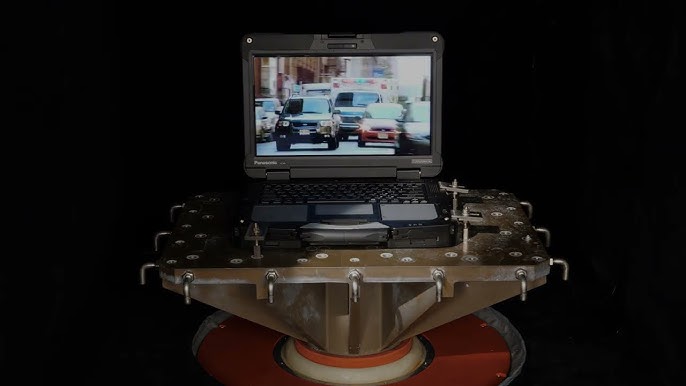
 Walking into a vibration lab feels part science lab, part industrial workshop. The star of the room is the shaker system.
- Electrodynamic Shaker Table: The electrodynamic shaker table is essentially a high-powered platform that moves in controlled vibration patterns. The computer is mounted on this table while powerful electromagnetic forces generate motion. It’s loud. It’s intense. And it’s precise. An engineer might smile and say, “This is where we try to shake the truth out of the device.” And that’s exactly what happens.
- Mounting Fixtures: Proper mounting is critical. The device must be secured in a way that replicates real-world installation—whether that’s docked in a patrol vehicle or mounted in industrial equipment. Poor mounting during testing would invalidate results. The goal is realism, not convenience.
- Accelerometers: Accelerometers are attached to measure actual vibration forces experienced by the device. These sensors verify that the programmed vibration matches the intended test profile. Without them, engineers would be guessing.
- Control Software: Control systems regulate frequency ranges, acceleration levels, and duration. Every movement is documented. Every anomaly is logged. Testing isn’t about drama. It’s about data.
Step-by-Step Vibration Testing Process
While the equipment looks complex, the process itself follows a clear structure.
- Pre-Test Inspection: Before testing begins, engineers thoroughly inspect the device. Baseline functionality is recorded. Ports are checked. Screens are examined. Internal diagnostics may be run. If something fails later, they need to know whether it was pre-existing.
- Mounting & Calibration: The device is mounted using fixtures that simulate real-world deployment. Accelerometers are attached, and calibration ensures the shaker is delivering accurate force levels. Precision at this stage determines the reliability of results.
- Test Execution: The shaker activates according to the selected standard profile. Frequencies sweep through designated ranges. Random vibration profiles may run for hours. The room hums with energy. Panels vibrate. Internal components experience stress cycles that simulate months or years of use.
- Functional Testing During Vibration: In many tests, the computer is powered on during vibration. Engineers monitor screen stability, wireless performance, and system responsiveness. As one lab technician once explained, “It’s not enough for the device to survive. It has to work while it’s being shaken.”
- Post-Test Inspection: After testing, the device undergoes another full inspection. Engineers look for cracks, loose connectors, degraded solder joints, and performance anomalies. Sometimes damage is visible. Other times it requires deeper diagnostics.

Common Failure Points Identified During Testing
Even rugged devices have weak spots, especially during early prototypes.
- Hard Drive Mounts in Legacy Systems: Older spinning drives were highly sensitive to vibration. Improper mounting could lead to data corruption or mechanical wear.
- Display Hinges: Hinges endure repeated motion and constant vibration. Over time, poorly reinforced hinges loosen or crack.
- Motherboard Solder Joints: Micro-fractures in solder joints can develop from repeated stress. These aren’t visible at first but can cause intermittent failures.
- I/O Ports and Docking Connectors: External connectors absorb shock and vibration, especially when cables apply torque.
- Internal Cable Routing: Poorly secured cables may rub against internal structures, leading to insulation wear over time. Each of these insights informs better design in future revisions.
How Rugged Computer Manufacturers Engineer for Vibration Resistance
Manufacturers don’t simply test and hope. They engineer proactively.
Example: Panasonic Toughbook 55
The Panasonic Toughbook 55 uses reinforced internal frames and shock-mounted components. Solid-state drives replace legacy spinning disks. Modular bays are designed to minimize play and movement.
Structural rigidity distributes stress instead of concentrating it.
Example: Panasonic Toughbook 40
The Panasonic Toughbook 40 goes even further with enhanced sealing, reinforced port covers, and robust docking integration for vehicle environments.
It’s built not just to pass tests—but to endure years of field vibration.
Difference Between Lab Testing and Real-World Vibration
Laboratories create controlled simulations. The real world creates unpredictability.
- Controlled vs. Unpredictable Exposure: Lab tests follow defined patterns. Real-world environments introduce unexpected spikes and irregular motion.
- Cumulative Micro-Fatigue Over Years: Years of subtle vibration can create micro-fatigue that exceeds certification minimums.
- Importance of Lifecycle Testing Beyond Certification Minimums: Forward-thinking manufacturers conduct extended lifecycle testing beyond the minimum requirements. Certification is the baseline, not the finish line.
Why Vibration Testing Impacts Total Cost of Ownership (TCO)

- Fewer failures mean fewer service calls and less downtime.
- Components that survive vibration cycles last longer in real-world use.
- Longer operational life improves ROI across fleets.
- Certified rugged devices often retain higher secondary market value.
Conclusion
Vibration testing may not be glamorous, but it’s one of the most important processes in rugged computing. It reveals weaknesses before customers experience them. It turns theoretical durability into measurable resilience.
When organizations invest in rugged systems, they’re investing in reliability under stress. And understanding how those devices are tested provides confidence that they’ll perform when conditions get rough.
For buyers exploring rugged solutions or replacements, working with experienced specialists like Bob Johnson’s Computer Stuff can help translate lab certifications into real-world deployment confidence. Because in environments where everything shakes, stability matters more than ever.