

 9am – 5pm Eastern, Monday – Friday
 133 N Dupont Blvd Ste 103, Smyrna, DE 19977
 Sale Tax Free Shopping!
Solutions to the Most Common Problems with the Panasonic Toughbook FZ-55
17th Jul 2026
The Panasonic Toughbook FZ-55 has earned a reputation as one of the most reliable semi-rugged laptops on the market. We see hundreds of these systems come through our shop every year, and compared to many other business laptops, major hardware failures are relatively uncommon.
That doesn’t mean they’re perfect. Like any computer that spends its life in service vehicles, warehouses, factories, or field environments, there are a few issues that appear more often than others.
Below are the most common Panasonic Toughbook FZ-55 problems we’ve encountered, along with a few troubleshooting tips before you assume the worst.
White Spots or Screen Burn-In
One of the most common cosmetic issues we see on the FZ-55 is the appearance of white pressure spots on the LCD. These bright spots usually appear on light backgrounds and are often caused by pressure applied to the back of the display when the laptop is closed.
Unlike OLED displays, this isn’t true “burn-in.” Instead, it’s damage to the LCD layers caused by prolonged pressure or impact.
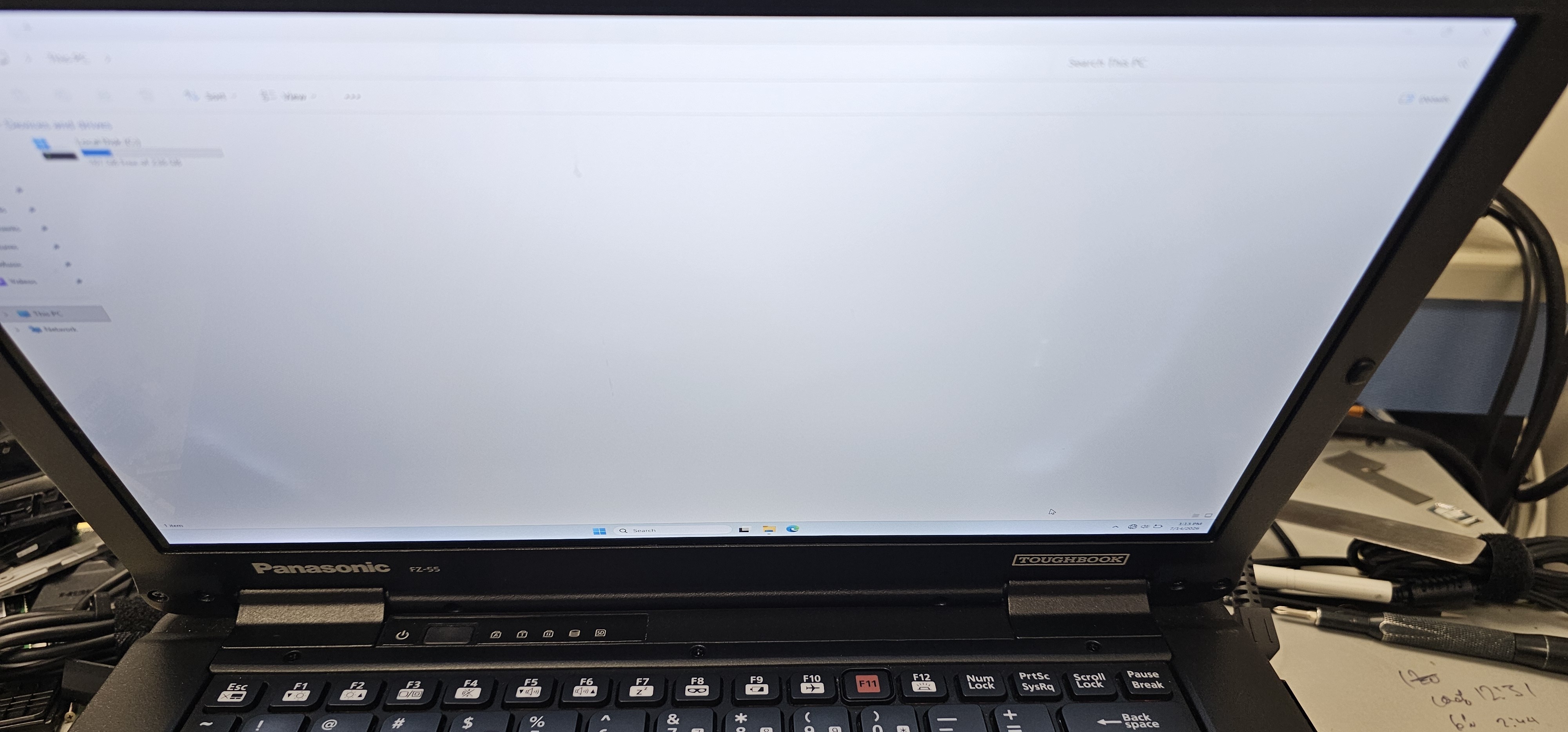
If you’ve owned a Panasonic Toughbook CF-54, this problem will probably look familiar, as the CF-54 experienced the same issue fairly frequently.
Unfortunately, once these spots appear, they typically cannot be repaired. Replacing the LCD assembly is the only permanent solution.
Keyboard Failures
The keyboard is another component that occasionally fails on the FZ-55.
Sometimes this is simply normal wear after years of heavy use, but liquid damage is also a surprisingly common cause. Keep in mind that the FZ-55 is a semi-rugged unit with an IP Rating of IP53. That 3 represents a lower resistance to water compared to an FZ-40 with an IP rating of IP65,
While the FZ-55 is designed to handle spills better than a standard business laptop, liquid can still get inside under the right circumstances. During one teardown, technicians discovered a puddle of coffee sitting beneath the keyboard. More concerning were two small openings beneath the keyboard assembly that allowed the liquid to reach the motherboard, where corrosion could begin.
The keyboard itself may fail first, but if liquid reaches the system board, the repair can become much more expensive.
If your keyboard suddenly stops responding after a spill, power the laptop off immediately and have it inspected before corrosion spreads.
 Broken Port Covers and Antenna Covers
Most FZ-55s spend their lives in trucks, police vehicles, maintenance shops, or construction sites. As a result, physical wear is expected.
The parts we replace most often on the units that we refurbish include:
- Port covers
- Antenna covers
- Small plastic trim pieces
- Latches and hinges
These components are designed to protect the internal ports from dust and moisture, but repeated daily use eventually takes its toll.
Fortunately, these parts are generally inexpensive compared to replacing major internal components.
Laptop Won’t Turn On After Restarting
One of the more confusing issues reported by owners is a laptop that suddenly refuses to power on after a perfectly normal restart.
A typical scenario looks something like this:
- The laptop was working normally.
- Windows was restarted.
- The system never powered back on.
- Battery LEDs still illuminate when the charger is connected.
- Nothing appears on the display.
Before assuming the motherboard has failed, try performing a complete power reset.
- Remove the main battery.
- Disconnect the AC adapter.
- Hold the power button for at least 30 seconds.
- Leave the battery removed and reconnect only the AC adapter.
- Try powering the system back on.
This procedure drains any remaining charge from the capacitors and can clear an unusual power lock condition that occasionally occurs.
If the laptop still shows no signs of life after this process, the motherboard is the most likely culprit.
Touchpad Stops Working After Reinstalling Windows
This isn’t a hardware failure, but it’s common enough to mention.
After reinstalling Windows, some users discover that the touchpad no longer functions correctly because the Panasonic touchpad driver was not automatically installed.
If you’re planning to reload Windows on your FZ-55, it’s a good idea to download the necessary drivers in advance and store them on a USB drive. Installing the correct touchpad driver usually restores full functionality within minutes.
FZ-55 Toughbook Is Still A Great Option
The Panasonic Toughbook FZ-55 is one of the best rugged laptops Panasonic has released in recent years. Compared to previous generations, serious hardware failures are relatively uncommon, and most of the issues we see involve wear-and-tear items like keyboards, LCDs, and protective covers rather than major internal components.
As we continue repairing, refurbishing, and testing these systems, we’ll keep this page updated with any new common problems, fixes, and maintenance tips that owners should know about.