Refurbished Panasonic Toughpad and Toughbook Tablets
Find a refurbished Panasonic rugged tablet that fits
your software, work environment, and budget. At
Bob Johnson’s Computer Stuff, Inc., we carry
Panasonic Toughpad and Toughbook tablets for field
service, public safety, utilities, automotive
diagnostics, and other mobile work.
Compare Toughpad FZ-G1, Toughbook FZ-G2, and Toughbook
CF-33 configurations, then review the generation,
condition, memory, storage, installed features,
and included accessories on each listing.
FZ-G1, FZ-G2, or CF-33?
-
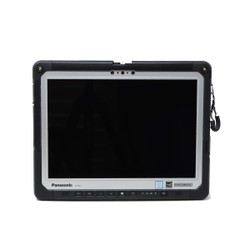
Toughpad FZ-G1:
Compare refurbished generations and condition
options against your software requirements.
Review the installed memory, storage, operating
system, and any included reader or connectivity
features.
-
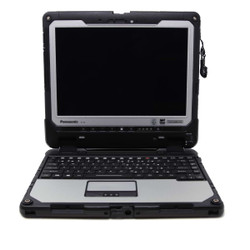
Toughbook FZ-G2:
A modular rugged tablet with expansion options
and a compatible keyboard option. Check the
specific generation and installed modules;
not every available feature is included
in every configuration.
-
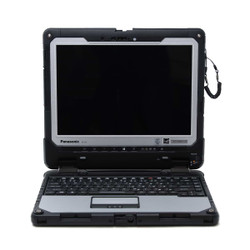
Toughbook CF-33:
A rugged tablet designed to work with a
compatible detachable keyboard. Compare the
available generations and configurations,
and confirm whether the listing includes
the tablet alone or a keyboard setup.
Panasonic uses the Toughpad name for models such as
the FZ-G1 and the Toughbook name for models such as
the FZ-G2 and CF-33. This collection brings those
Panasonic rugged tablet options together so you
can compare them in one place.
Choose the Generation and Memory You Need
A model family can include several generations,
often identified by a Mark or MK designation.
Compare the actual processor, memory, storage,
and installed operating system rather than
relying on the family name alone.
Before ordering, check the requirements for your
diagnostic software, reporting tools, mapping
applications, or other business programs.
If your organization requires officially supported
operating-system hardware, confirm that requirement
for the exact configuration you are considering.
Choose a tablet with enough memory for your workload
from the start. Memory upgrade availability depends
on the model and hardware design, so do not assume
you can add RAM later.
Check Installed Modules and Compatible Accessories
Panasonic tablet configurations can differ even
within the same model and generation. Check the
individual listing for the connections and
installed hardware your work requires, including:
- USB, Ethernet, serial, or other equipment connections.
- GPS or cellular connectivity.
- Barcode readers or contactless readers.
- Smart card readers and other security hardware.
- Display, stylus, and supported touch-input options.
The FZ-G2 offers modular expansion options, but
module compatibility depends on the generation,
configuration, and expansion area. Contact us
before ordering if you need a specific feature
or want to change an installed module.
Plan Your Keyboard, Dock, and Battery Setup
Compare the complete setup, not just the tablet.
Review the included accessories and identify
any compatible keyboard, vehicle dock, office
dock, mount, charger, or additional battery
you will need.
Do not assume an accessory is included because it
appears in a model’s promotional materials.
Check the product description and selected options.
Battery-swapping capability also depends on the
model and installed battery arrangement.
If you already own a dock or specialized accessory,
share its model number with our team before
ordering. We can help you check compatibility
with the tablet configuration you are considering.
Compare Condition Before You Buy
Our refurbished Panasonic tablets are inspected,
tested, and cleaned before sale. This collection
includes standard refurbished, Low Hour, and
Scratch & Dent listings, so review the
condition stated on the individual product page.
Product listings feature photos from our actual
inventory. Photos may show a representative unit
from the same batch rather than the exact
individual tablet shipped.
Read any disclosed wear or functional limitations,
especially on Scratch & Dent listings. Contact
us before purchasing if you need clarification
about condition, included accessories, or a
particular feature.
Understand Protection Ratings
The tablets currently displayed in this collection
are listed with IP65 protection ratings. Compare
the published specifications for the exact model
and generation, and follow the manufacturer’s
instructions for port covers, seals, and exposure.
IP65 describes dust-tight protection and resistance
to water jets under specified test conditions;
it does not establish protection against immersion.
Environmental test information should not be
treated as a guarantee against every drop,
spill, or type of accidental damage.
Panasonic Tablet Warranty and Support
Every refurbished Panasonic Toughpad and Toughbook
tablet we sell includes our automatic,
non-transferable Limited Lifetime Warranty.
Covered service includes diagnostics and labor
for as long as you own the computer.
The first six months also include eligible
replacement parts, excluding batteries. After
that initial period, necessary replacement
parts are charged separately. Extended warranty
options are available, and exclusions apply.
Review our
complete warranty policy
for terms and coverage details.
Get Help Choosing a Panasonic Tablet
Browse the Panasonic tablets above to compare
current configurations, condition options,
pricing, and availability. Need help narrowing
your choices? Fill out our
Selection Assistance Form
or call
302-659-2727.
Tell us about your software, working conditions,
required connections, existing accessories, and
budget. If you are still comparing brands, explore
our
complete rugged tablet selection.
Frequently Asked Questions

|
What is the difference between a Panasonic Toughpad and a Toughbook tablet?
|
Panasonic uses different product-family
names across its rugged tablet lineup.
The FZ-G1 is known as a Toughpad, while
the FZ-G2 and CF-33 are marketed as
Toughbooks.
The name alone does not tell you the
computer’s performance, installed
features, or accessory compatibility.
Compare the exact model, generation,
and configuration before choosing.
|
Should I choose an FZ-G1, FZ-G2, or CF-33?
|
Start with your software, required
connections, preferred screen layout,
accessory needs, and budget. Compare
the actual hardware and condition of
the listings available.
The FZ-G2 offers modular expansion
options, while the CF-33 can be paired
with a compatible detachable keyboard.
An FZ-G1 may also meet your requirements
if its processor, memory, operating
system, and installed features fit
your workload.
Contact our team if you need help
comparing specific configurations
rather than model names alone.
|
Can I upgrade the RAM in a Panasonic rugged tablet?
|
Do not assume a Panasonic rugged tablet
supports a later RAM upgrade. Upgrade
availability depends on the exact model,
generation, and hardware design.
Choose a listed configuration with enough
memory for your applications. If you
expect to need more RAM, call
302-659-2727
before ordering so we can help you identify
a suitable configuration and confirm
upgrade options.
RAM and SSD storage are different.
An available storage upgrade or expansion
module does not mean the tablet’s
RAM can also be upgraded.
|
Is a detachable keyboard included with my Panasonic tablet?
|
Included accessories depend on the
listing. Some configurations are sold
as tablets, while others may include
a keyboard or offer one as an option.
Review the product description and
selected options before ordering.
If you already own a keyboard or dock,
confirm compatibility with the exact
tablet model and generation.
|
What should I check before buying a refurbished Panasonic tablet?
|
Compare the processor generation, memory,
storage, operating system, installed
options, and included accessories
against your requirements.
Review the condition description and
inventory photos. Low Hour and
Scratch & Dent listings provide
additional condition or usage
information, and any disclosed
limitations should be considered
before purchasing.
If you need a barcode reader, GPS,
cellular connectivity, or a particular
port, confirm that the exact configuration
includes it or supports the required upgrade.
|
What warranty comes with a refurbished Panasonic tablet?
|
Every refurbished Panasonic Toughpad
and Toughbook tablet we sell includes
our automatic, non-transferable
Limited Lifetime Warranty.
Diagnostics and labor are covered
for as long as you own the computer.
The first six months also include
eligible replacement parts, excluding
batteries. After that initial period,
necessary replacement parts are
charged separately.
Extended warranty options are available.
Exclusions apply, including system
batteries and part replacement due
to physical damage. Review our
complete warranty policy
for coverage terms and exclusions.


 9am – 5pm Eastern, Monday – Friday
 133 N Dupont Blvd Ste 103, Smyrna, DE 19977
 Sale Tax Free Shopping!