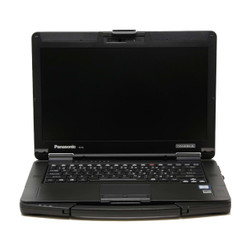
Refurbished Panasonic Toughbook FZ-55 Laptops
Build your mobile workstation around the connections
and features your work requires. The Panasonic
Toughbook FZ-55 combines a 14-inch notebook layout
with modular xPAK expansion areas for compatible
ports, readers, storage, and other hardware.
At Bob Johnson’s Computer Stuff, Inc.,
we offer refurbished FZ-55 configurations with
different generations, processors, screens,
condition options, and installed equipment.
Compare the base laptop first, then identify
the expansion options you need.
Start with the Generation and Screen
Our FZ-55 selection includes MK1 configurations
with eighth-generation Intel Core processors
and MK2 configurations with eleventh-generation
Intel Core processors. Compare the exact
processor, memory, storage, and operating
system on the listing you plan to purchase.
Also check whether the laptop has a touchscreen
or non-touch display. Screen resolution,
outdoor visibility, stylus support, and input
capabilities should be confirmed for the
individual configuration.
The generation matters when selecting upgrades.
Do not assume memory, storage components, or
xPAK modules are interchangeable across all
FZ-55 models.
How the FZ-55 xPAK System Works
Panasonic’s xPAK system provides dedicated
expansion areas for compatible modules. Rather
than selecting only a processor and SSD,
you can also consider the connections,
readers, and accessories needed for
your applications.
Each expansion area has its own compatible
options. Modules that use the same area
generally represent alternative configurations,
not features you can assume will all be
installed together.
Review the installed modules and available
product-page options before ordering.
The lists below describe examples of
compatible expansion choices; availability
and generation compatibility must be
confirmed for your laptop.
Rear Expansion Area: Equipment Connections
The rear expansion area can provide additional
connections for diagnostic interfaces,
external displays, networks, and specialized
equipment. Documented options include:
- VGA + serial + USB-A.
- VGA + serial + additional LAN.
- VGA + serial + Fischer USB, where compatible.
Match the port combination to your actual
equipment. Share the interface or accessory
model number with us if you need help
identifying the appropriate rear module.
Front Expansion Area: Readers or a Second Battery
Depending on the configuration, front
expansion options can include:
- Fingerprint reader.
- Contactless smart card reader.
- Insertable smart card reader.
- Second battery.
Consider the trade-off between authentication
hardware and an additional battery when
planning this area. Confirm the module
part number and compatibility with your
organization’s authentication system.
Universal Expansion Area: Drives and Specialized Hardware
Compatible universal-bay options can include:
- DVD drive.
- Blu-ray drive.
- Secondary SSD module.
- Insertable smart card reader.
- Barcode reader.
- AMD dedicated graphics module for compatible MK1 units.
The MK1 AMD graphics module is not compatible
with the MK2. Confirm the laptop generation,
module part number, and required installation
procedure before purchasing an expansion module.
Plan the Complete Configuration Before You Order
Start with the modules your work requires,
then check which expansion areas they occupy.
A second SSD, optical drive, reader, or
other module may compete for the same
available space.
Memory and primary-storage upgrades should
also be checked separately from xPAK choices.
Use the selectable options on the product
page, or contact us if you need a
configuration that is not shown.
If you already own an FZ-55 module, vehicle
dock, or other accessory, share its part
number and your computer’s complete
model number. We can help you check
compatibility before ordering.
Installing or swapping compatible Panasonic xPAK
expansion modules does not, by itself, void
your BJCS warranty or extended warranty coverage.
xPAK changes are exempt from our restriction
on retrofitting parts. Confirm compatibility
and follow the applicable installation
instructions before changing a module.
Where Semi-Rugged Protection Fits Your Work
The FZ-55 is a semi-rugged laptop, and
our listed configurations carry an IP53
protection rating. Consider it for work
that moves between a desk, vehicle,
service call, and field location, while
checking the manufacturer’s operating
limits against your environment.
Do not treat the FZ-55 as equivalent to
a fully rugged model simply because
both use the Toughbook name. Review
the specific protection rating and
environmental test information rather
than assuming every Toughbook tolerates
the same exposure.
Refurbished Condition and Support
Our refurbished FZ-55 laptops are inspected,
tested, and cleaned before sale. Review
the listing’s condition description,
inventory photos, included accessories,
and disclosed wear or limitations.
Inventory photos may show a representative
unit from the same batch rather than
the exact individual computer shipped.
Contact us if you have a particular
condition concern.
Every refurbished FZ-55 we sell includes
our automatic, non-transferable Limited
Lifetime Warranty. Extended warranty
options are available; review our
complete warranty policy
for coverage terms and exclusions.
Need help planning an FZ-55 configuration?
Fill out our
Selection Assistance Form
or call
302-659-2727.
Tell us about your applications, required
ports, readers, accessories, and budget.
For compatible replacement components
and expansion options, browse our
Toughbook FZ-55 parts.
If you are comparing other models,
explore our
refurbished Panasonic Toughbooks.
Frequently Asked Questions

|
Are xPAK modules interchangeable between FZ-55 generations?
|
Many accessories can carry over,
but compatibility is not universal.
Check the exact module part number
against your FZ-55 generation.
Panasonic identifies the MK1 AMD
dedicated graphics module as
incompatible with the MK2.
Its MK2 documentation also identifies
exceptions involving MK1 RAM and
main storage drives.
Contact us with your complete laptop
model number and module part number
before buying an upgrade for an
existing FZ-55.
|
Can I add a second SSD or optical drive to an FZ-55?
|
Compatible secondary SSD and optical
drive modules are among the universal
expansion-area options. Check the
generation, module compatibility,
and current availability.
Modules that occupy the same
expansion area should not be
assumed to fit together. Tell us
which features you need so we
can help you plan the configuration.
|
Does every FZ-55 include a touchscreen?
|
No. Our FZ-55 selection includes
touchscreen and non-touch
configurations. Check the exact
listing for screen type,
resolution, outdoor visibility,
and included accessories.
If you need a stylus, glove input,
or a particular display feature,
confirm it before ordering rather
than assuming it is included
with every FZ-55.
|
Are xPAK upgrades included with the laptop?
|
Included hardware depends on the
listing and selected options.
A module being compatible with
the FZ-55 does not mean it is
installed in every computer.
Review the product description
and expansion selections before
purchasing. Call
302-659-2727
if you need a particular combination
of modules or want help checking
availability.
|
What warranty comes with a refurbished FZ-55?
|
Every refurbished FZ-55 we sell
includes our automatic,
non-transferable Limited Lifetime
Warranty. Diagnostics and labor
are covered for as long as
you own the computer.
The first six months also include
eligible replacement parts,
excluding batteries. After that
initial period, necessary replacement
parts are charged separately.
Compatible Panasonic xPAK module installations
and swaps are exempt from our retrofit
restriction and do not, by themselves, void
warranty or extended warranty coverage.
Other warranty terms and exclusions still apply.
Extended warranty options continue
eligible enhanced coverage for
the purchased term. They do not
provide blanket accidental-damage
coverage. Review our
warranty policy
for exclusions, service terms,
and shipping responsibilities.


 9am – 5pm Eastern, Monday – Friday
 133 N Dupont Blvd Ste 103, Smyrna, DE 19977
 Sale Tax Free Shopping!