Getac V110 starting at $199.30
Fully Rugged Tablets starting at $99.30!
Sign in

Blog

Blog Topics & Categories

How Much RAM Do You Actually Need in a Rugged Laptop?

How Much RAM Do You Actually Need in a Rugged Laptop?

When purchasing a rugged laptop, users tend to prioritize features related to its strength and durability because they want their laptop to withstand impacts, dust, high and low temperatures, water, and a labor-intensive environment. However, speed is another important aspect of a laptop. RAM plays…
How Much RAM Do You Actually Need in a Rugged Laptop?
Toughbook Generations(MKs) Explained: Is the Upgrade Worth It?

Toughbook Generations(MKs) Explained: Is the Upgrade Worth It?

Shopping for a rugged computer isn’t like picking out a standard laptop. Your decision matters for how you work in tough environments every day. Maybe you’re a field technician, first responder, or construction manager who needs a computer that won’t quit when the weather turns, or…
Toughbook Generations(MKs) Explained: Is the Upgrade Worth It?
A note on model numbers (for Toughbook nerds)

A note on model numbers (for Toughbook nerds)

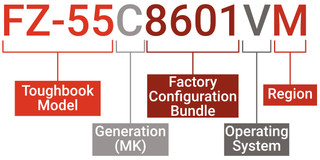
If you’re reading this, you are either doing your research before buying a Toughbook, looking for a replacement part for your Toughbook, or you are a Toughbook nerd. (I use that as a term of endearment.) Decoding the long-form model number of your Toughbook can help you determine which specifi…
A note on model numbers (for Toughbook nerds)
Upgrading the Memory in Your Toughbook

Upgrading the Memory in Your Toughbook

You need to get a lot of work done in a harsh environment, and that means running multiple applications at once, all day long. However, if your computer has limited memory, it might not be able to keep up with this kind of demand. Adding more available memory will help your computer provide a better…
Upgrading the Memory in Your Toughbook
Installing Windows 11 24H2 On A Rugged Computer

Installing Windows 11 24H2 On A Rugged Computer

With Windows 10 becoming a thing of the past, it’s time to move on to Windows 11. First, you need to see if your computer is compatible. You can check the Windows 11 upgrade requirements to see if your computer is eligible. If it is, you can just go into your setting, and you should be able to…
Installing Windows 11 24H2 On A Rugged Computer